How to recover Deleted Files from Flash Drive
Using an external hard drive and flash drive to store important data has turned out to be very common now-a-days. This removable storage device enables the users to store different kinds of data in plenty. Owing to the great store facility, Flash Drive/External Hard Drive is frequently used to keep and back-up business data. The users can easily transfer the data from the drive to a PC or laptop within a few minutes. The users can store excel files, word files, pictures, movies, songs, and other files/data using Flash Drive/External Hard Drive.
Despite of uses and advantages, the users may face some difficulties while using flash drive/external hard drive that may cause loss of important files and data. Sometimes, users accidentally delete the folder or files by hitting the ‘Delete’ button. The situation can become worse when you can’t get them in the recycle bin. To deal with such situation and recover lost files, you should learn how to recover deleted files from Flash Drive/External Hard Drive.
Can I recover deleted files from Flash Drive/External Hard Drive?
When you remove a file or folder from a flash drive or external hard drive, it does not move to the Recycle Bin. Deletion does not always remove the file data immediately, so stop using the drive to reduce the risk of overwriting it. Data recovery software for Windows can scan the affected drive for files that are still recoverable.
Amrev Data Recovery Software is the best data recovery software for rescuing deleted files from Flash Drive/External Hard Drive. Designed with an easy-to-use interface, it allows the users to retrieve deleted files within no time.
Recover memory card files using Data Recovery Software.
Follow the below mentioned steps to recover deleted files from Flash Drive/External Hard Drive.
Step 1 : Select a drive and click on "Scan Lost Files" button, recovery process will get initiated.
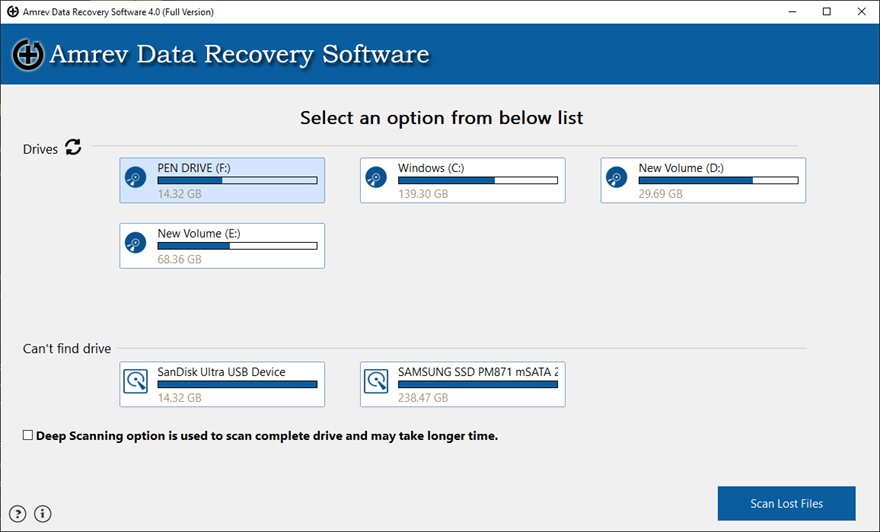
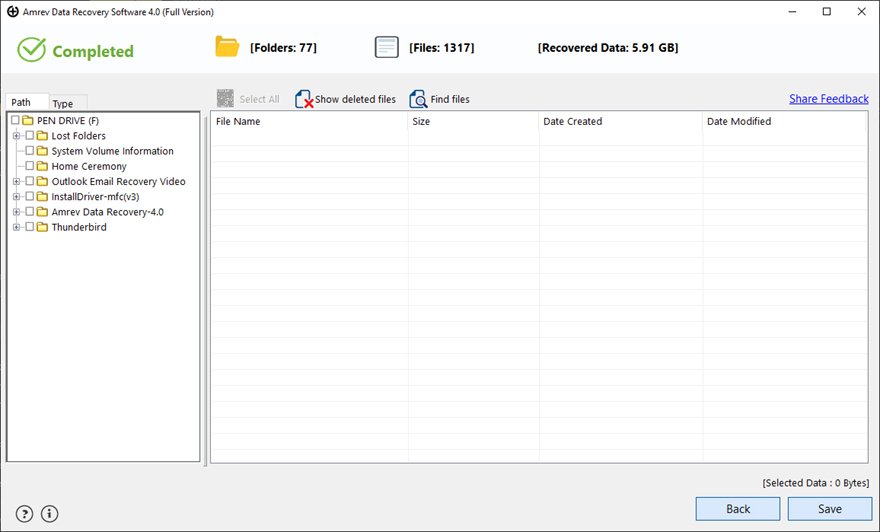
Step 2 : After completion of the scanning process, the recovered files are displayed in a well organized tree like structure. Select the files/folders you want back and click on "Save" to save on your machine.
.