
This user manual will provide step by step guidance for recovery, hence it is suggested to go through this manual before you use Amrev Thunderbird Email Recovery Software.
Amrev Thunderbird Email Recovery is designed to recover corrupt/deleted/damaged Mozilla Thunderbird e-mail messages.
As soon as you recover your damaged/corrupt file, you can see the contents of each individual mail; click on any particular email and you can preview the exact content of mail in the bottom pane including the attachment.
It is a unique Thunderbird recovery tool as it efficiently restore emails from corrupt files. Recovered mails are saved as .eml files and imported back into Mozilla Thunderbird.
Recovered *.eml files are saved in the selected destination folder, once recovery process is over; which simply can be imported by drag and drop function to a new folder in Mozilla Thunderbird.
IMPORTANT! It is recommended to download and install the software on to fixed drive (like hard drive). Please do not install the software on the removable drive (like memory card).
Amrev Thunderbird Email Recovery is developed to work on below mentioned system configurations:
Amrev Thunderbird Email Recovery
End-User License Agreement
Copyright ©
Amrev Technologies LLP.,India
All rights reserved.
Please read this document carefully. This is a legal agreement between you (either an individual or an entity) and Amrev Technologies LLP, the vendor of Email Recovery Software. This Agreement supersedes any prior version license and governs your use of the software.
Anyone may use the demo version of Amrev Thunderbird Email Recovery. Before deciding upon the purchase, you may have a chance to verify whether your lost data can be recovered. But if you wish to save recovered files, you must purchase the full version..
Once registered, the user is granted an exclusive license to use. Amrev Thunderbird Email Recovery on one computer, for any legal purpose, at a time. You need a license for a machine on which the program is installed. The registered Amrev Thunderbird Email Recovery may not be rented or leased but can be ermanently transferred, if the person who receiving it agrees to the terms of this license. If the software is updated, the transfer must include the update and all previous versions.
The Amrev Thunderbird Email Recovery demo version may be freely distributed, if the distribution package is not modified. No person or company may charge a fee for the distribution of Amrev Thunderbird Email Recovery demo version without written permission from the copyright holder.
Amrev Thunderbird Email Recovery IS DISTRIBUTED "AS IS". NO WARRANTY OF ANY KIND IS EXPRESSED OR IMPLIED. YOU USE AT YOUR OWN RISK. THE AUTHOR WILL NOT BE LIABLE FOR DATA LOSS, DAMAGES, LOSS OF PROFITS OR ANY OTHER KIND OF LOSS WHILE USING OR MISUSING THIS SOFTWARE.
You may not use, copy, emulate, clone, rent, lease, sell, modify, de-compile, disassemble, otherwise reverse engineer, or transfer the licensed program, or any subset of the licensed program, except as provided for in this agreement. Any such unauthorized use shall result in immediate and automatic termination of this license and may result in criminal and/or civil prosecution.
COPYRIGHT. The software is distributed by Amrev Technologies LLP, and is protected by International copyright laws and treaty provisions.
SOFTWARE SUPPORT. Support will only be provided by e-mail and only on the most current version. Queries regarding the installation and use of the software should be submitted by e-mail to support@amrevsoftware.com. Requests for additional features and enhancements should be submitted by e-mail to info@amrevsoftware.com. We will attempt to implement all reasonable requests but is not obliged to implement it. If you have questions about buying or updating our products, please Email us at sales@amrevsoftware.com.
RESERVATION. Amrev Technologies LLP, reserves the right to change the license agreement of the software. Amrev Technologies LLP, reserves the right to change prices without notice. Amrev Technologies LLP, reserves all rights that are not expressly granted here.
Installing and using Amrev Thunderbird Email Recovery signifies acceptance of these terms and conditions of the license. If you do not agree with the terms of this license you must remove Amrev Thunderbird Email Recovery files from your storage devices and cease to use the product.
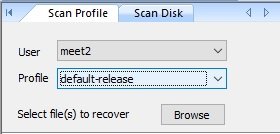
Step 1. Launch Amrev Thunderbird Email Recovery and select and select profile from "Scan Profile" tab
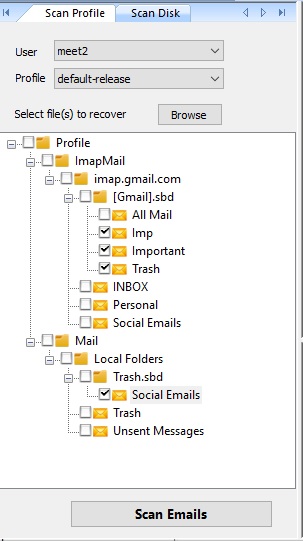
Step 2. Select items to recover and press "Scan Emails" button
Step 3. As soon as you click on "Scan Emails" button, recovery process gets started. Each item will be recovered in separate tab as shown in below screenshot. You can also see the recovered email preview just clicking on it.
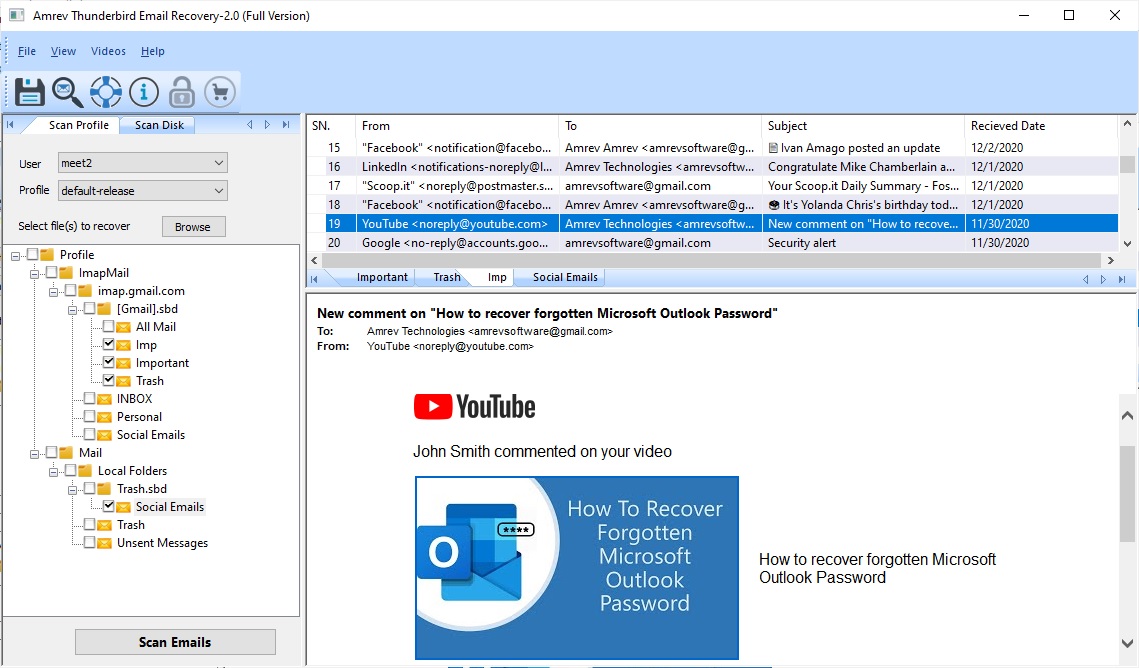
Step 4. Just save the recovered emails by clicking on "Save" button.
Step 1. Launch Amrev Thunderbird Email Recovery and select drive from "Scan Disk " tab and press "Scan Emails" button.
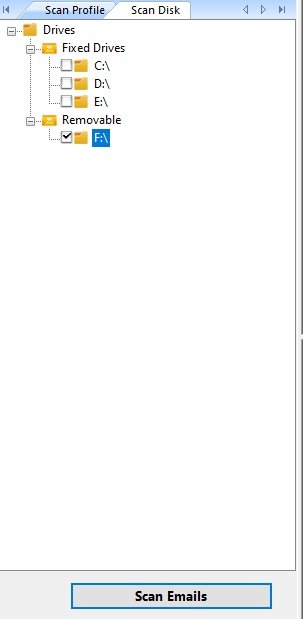
Step 2. As soon as you click on "Scan Emails" button, recovery process gets started. Each item will be recovered in separate tab as shown in below screenshot. You can also see the recovered email preview just clicking on it.
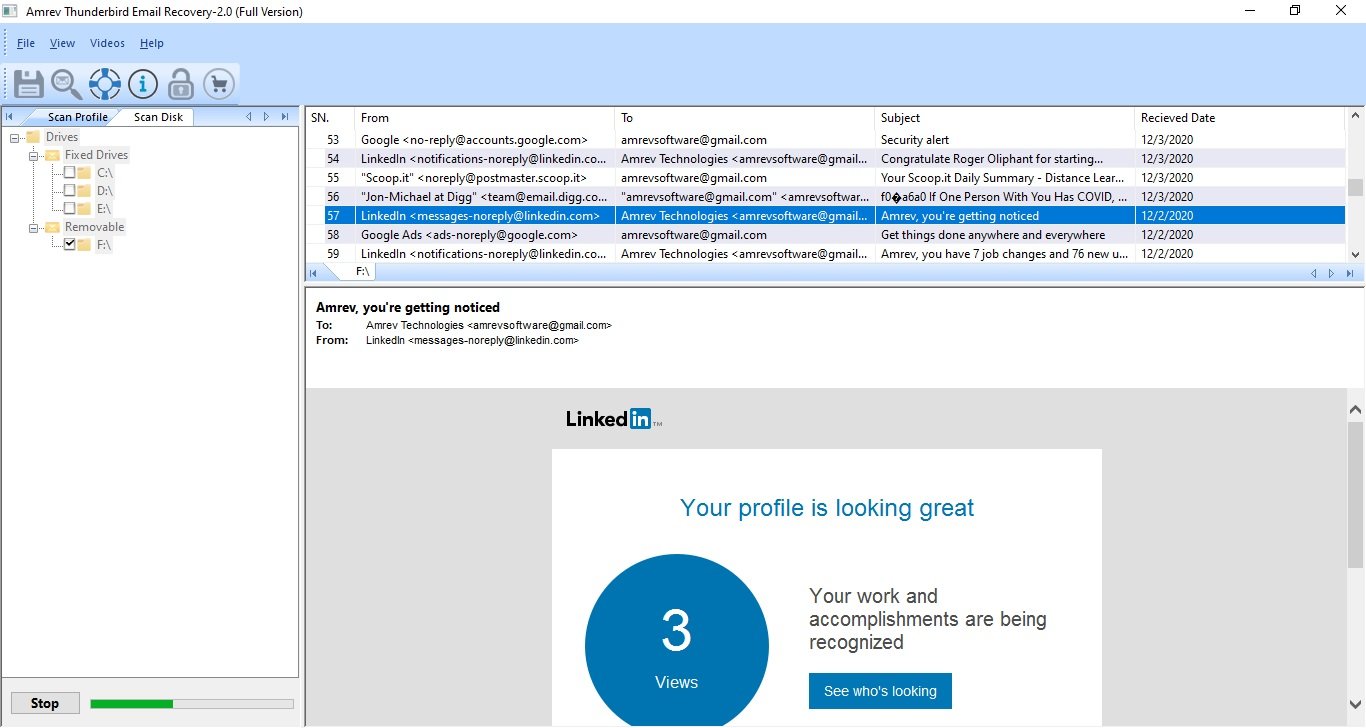
Step 3. Just save the recovered emails by clicking on "Save" button.
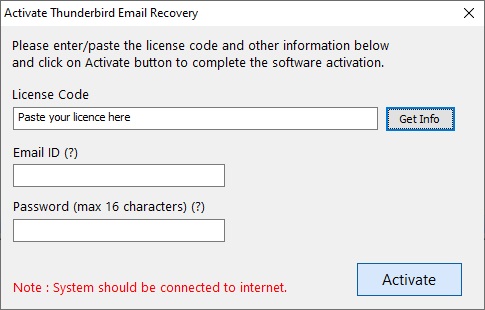
Step 1. Launch the software and click on "Activate" button.

Step 2. Enter the Licence Key in the text field and click on "Get Info" button. Email ID and Password fields will be enabled. Enter your email ID and password and click on "Activate" button. If you have entered a valid key, the software will be activated and confirmation message is displayed.
Email ID - You can enter any email ID to retrive your password later.
Password - You can enter any 16 characters password. This password will be used later to reactivate the software.
Step 1. Launch the software and click on "Activate" button.
Step 2. Enter the Licence Key in the text field and click on "Get Info" button. Password and New Password fields will be visible. Enter your old password in Password text box and enter new password in New Password text box and click on Activate button. If you have entered correct password, the software will be activated and confirmation message is displayed.
Password - Enter your old password, Resend Password button will be used to retrive forgotton/lost password on registered email ID.
New Password - You can enter any 16 characters password. This password will be used later to reactivate the software.

For all your technical queries regarding Amrev Thunderbird Email Recovery, you may send an email to support@amrevsoftware.com
For all your queries regarding Licensing, software usage, you may send an email to sales@amrevsoftware.com
Mozilla Thunderbird, Thunderbird is a trademark or registered trademark of Mozilla Foundation.
All other trademarks acknowledged.